
Vulkan Configurator
Configure. Control. Develop faster.
Vulkan Configurator is LunarG’s intuitive graphical and command-line tool for managing Vulkan layers, the loader, and drivers. It accelerates your Vulkan application development by letting you quickly enable, order, and configure layers, manage devices, and share consistent setups.
What is Vulkan Configurator?
Vulkan Configurator makes the process of selecting and configuring Vulkan layers simple and reliable. It discovers layers and drivers on the system and lets you enable/disable/order them, apply per-layer settings, force or reorder physical devices, and generate the necessary configuration files.
It is open-source, ships as part of every Vulkan SDK and runs on Windows, Linux, and macOS. Launch the GUI with vkconfig-gui (or vkconfig –gui) or use the command-line interface for scripting and automation.
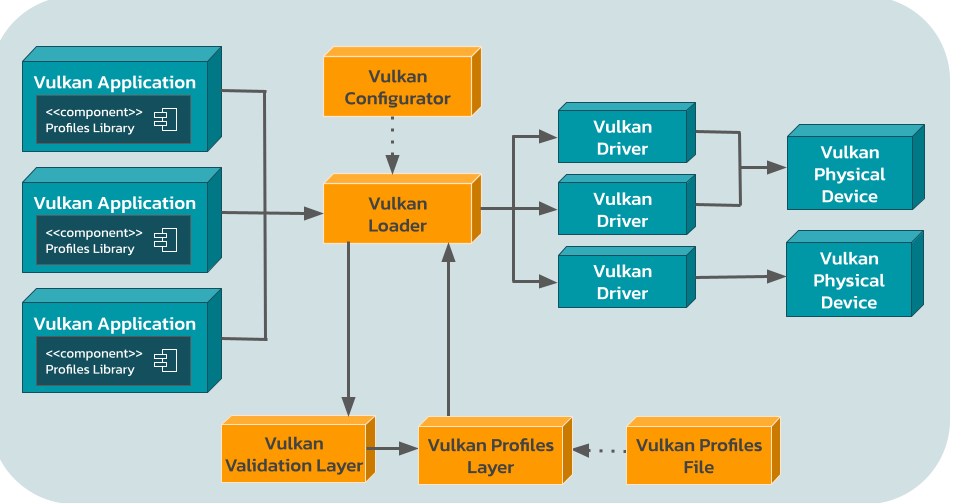
Interactive control of Vulkan layers
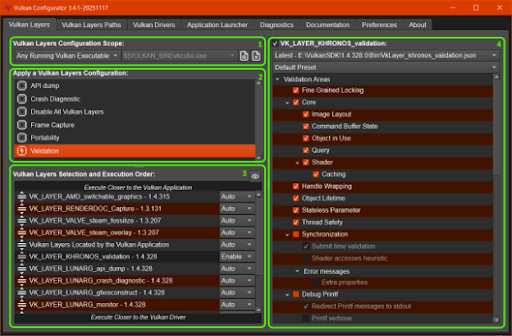
The Vulkan Layers tab is the core of Vulkan Configurator. It lets you control which layers are enabled, set their execution order, and configure individual layer settings through a clear visual interface.
Key sections include:
- Configuration Scope: Apply the setup globally to all Vulkan applications or only to a selected list of executables.
- Saved Configurations: Choose from built-in presets or your own saved configurations for common workflows.
- Layer Selection & Order: View all discovered layers on the system and drag to enable, disable, or reorder them.
- Layer Settings: Expand a tree of available options for each enabled layer (with presets when provided by the layer).
From the context menu you can also generate environment-variable scripts, vk_layer_settings.txt files, or VK_EXT_layer_settings C++ helper code for use outside the GUI.
Why developers rely on Vulkan Configurator
Value for Developers
Simplifies environment setup
Provides precise control of layers
Streamlines driver and device management
Improves diagnostics and sharing
Zero overhead in production
True Cross-Platform Consistency
The Result
You spend less time fighting environment setup and more time developing, debugging, and validating high-performance Vulkan applications.

Built for professionals who need correct Vulkan code
- Game & Application Developers — Quickly enable validation, capture layers, or custom utility layers while developing.
- Engine & Middleware Teams — Maintain consistent layer and driver configurations across machines and platforms.
- Driver & GPU Engineers — Force specific devices or inject software drivers for testing.
- Q/A & Validation Teams — Reproduce exact environments and share configurations.
- Researchers & Tool Builders — Discover layers and settings without digging through documentation.
Whether you are shipping a title, validating new hardware, or building tools on top of Vulkan, Vulkan Configurator removes the friction from system configuration during development.

Built, Maintained, and Delivered by LunarG
LunarG is the primary architect, lead developer, and ongoing maintainer of the Vulkan Configurator. We design and improve it in coordination with the Khronos Vulkan Working Group and the open-source community so it stays current with the loader, layers, and new Vulkan features.
Vulkan Configurator is open-source (part of the LunarG VulkanTools repository) and freely available. It ships in every official Vulkan SDK release.

Ready to get started?
Vulkan Configurator is included in every official SDK release. The easiest and most reliable way to get it is to download and install the latest Vulkan SDK.
- Download the latest Vulkan SDK for Windows, Linux, or macOS at vulkan.lunarg.com.
- Launch Vulkan Configurator from the Start menu (Windows) or run vkconfig-gui / vkconfig –gui.
- Explore the Layers and Drivers tabs, create a configuration, and launch your application.
Prefer the absolute latest changes or building from source? Visit the VulkanTools GitHub repository.
For documentation, see the Vulkan SDK docs or the “Configuring Vulkan Layers” white paper.
Partner with LunarG to do impossible things.
We believe collaboration is one of the great benefits and opportunities of being part of the visual computing community, and our strength is in our shared expertise. While we focus on your GPU coding issues, you can focus on creating unforgettable visual experiences.
Together, we’ll unlock the full power and potential of today’s GPU’s to surpass your customers’ expectations.