
KosmicKrisp
Production-ready Vulkan on Apple silicon
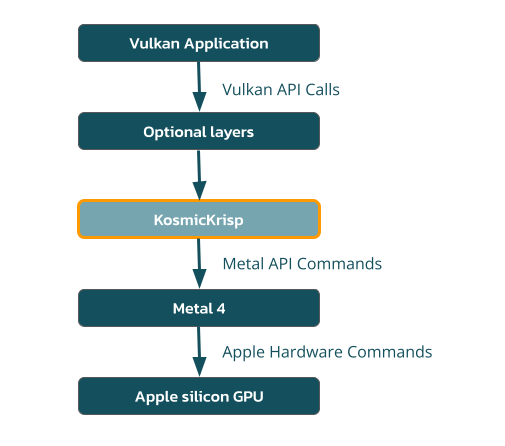
KosmicKrisp is a Mesa driver that maps Vulkan to Apple’s Metal API. It is Vulkan 1.4 conformant and built to run demanding Vulkan applications on Apple’s macOS platforms. With KosmicKrisp, the same Vulkan application code used on Windows and Linux can run on modern Macs.

What is KosmicKrisp?
KosmicKrisp is LunarG’s Vulkan-to-Metal driver for Apple Silicon. It is built inside Mesa’s Vulkan driver framework, utilizes Apple’s Metal 4 API, and is shipped both in the LunarG Vulkan SDK and upstream in Mesa.
KosmicKrisp is part of Mesa’s Vulkan driver framework. As of September 2026, KosmicKrisp is Vulkan 1.4 conformant.
KosmicKrisp does not support Intel-based Macs or Macs running macOS prior to macOS 26. (Apple has discontinued support for Intel-based Macs as of macOS 27, released in September 2026.)
Why KosmicKrisp?
Apple does not ship a native Vulkan ICD. Applications that already use Vulkan on Windows and Linux therefore need a Vulkan-to-Metal path on macOS. KosmicKrisp exists to make that path conformant, maintainable, current, and useful for real products.
Conformant
KosmicKrisp implements the Vulkan 1.4 API specification and is Vulkan 1.4 conformant.
Maintainable
Built on Mesa’s Vulkan driver framework and NIR compiler (shared, community-maintained compiler stack) and backed by LunarG CI and the wider Mesa developer community.
Current
KosmicKrisp development tracks new Vulkan versions and extensions as the Mesa Vulkan driver advances.
Useful for real products
Already used by games, engines, tools, and emulators (including work sponsored for the Google Android Emulator on Mac).
Key Features of KosmicKrisp
- Part of Mesa’s Vulkan driver framework
- Open source and MIT-licensed
- Vulkan 1.4 conformant
- Built on Apple’s Metal 4 (requires masOS 26 or later)
- Built and tested as part of LunarG’s CI with the Vulkan SDK, validation layers, and related tools
- Uses the Mesa compiler stack to translate shaders to the Metal Shading Language
- Supports modern Vulkan features used by current engines: dynamic rendering, tessellation, push descriptors, extended dynamic state, draw indirect count, subgroup operations, and a growing extension set
- Vulkan-conformant support for Vulkan development and debugging tools
- New Vulkan features and extensions will become available as Vulkan evolves
- Delivered in the Vulkan SDK
Why Developers use KosmicKrisp
Enables Vulkan applications on macOS
Your Vulkan application can now run on Apple platforms in addition to Linux, Windows, and Android. On Apple silicon, KosmicKrisp provides that path as a Mesa Vulkan driver over Metal.
Built to keep up with Vulkan
Because KosmicKrisp is a Mesa driver, it shares compiler infrastructure, runtime patterns, and review process with the rest of the open-source Vulkan driver ecosystem. That is how it reached Vulkan 1.3 conformance quickly and why Vulkan 1.4 support has already landed in current Mesa and SDK trains.
Fits the tools you already use
Since KosmicKrisp is a conformant Vulkan driver, developers can use Vulkan developer tools such as the Validation Layer and GFXReconstruct on macOS the same way they’re used on Linux or Windows platforms.
Ready for real workloads
KosmicKrisp is already being used for graphics and compute on Apple silicon, including demanding applications and emulator workloads. The current version includes substantial performance work on the Metal 4 encoding path, and optimization work continues to be a high priority.
Built, Maintained, and Delivered by LunarG
LunarG designs, implements, and maintains KosmicKrisp in collaboration with the Mesa and Khronos communities. It is still under active development, with work focusing on performance optimization, broader extension coverage, tool chain integration, and continuous tracking of the Vulkan API.
Google sponsored the original effort to enable a performant and full-featured Google Android Emulator running on macOS.

Ready to get started?
KosmicKrisp is included in the official Vulkan SDK.
- Download the latest Vulkan SDK for macOS at vulkan.lunarg.com.
- Use the Vulkan Configurator to make KosmicKrisp your system wide Vulkan driver, or bundle KosmicKrisp and the Vulkan loader in your application bundle
- Confirm with vulkaninfo
- Develop with validation layers as on any other platform
Prefer building from source or tracking latest changes? Start with the official repository and documentation: https://docs.mesa3d.org/drivers/kosmickrisp.html
Additional resources:
Partner with LunarG to do impossible things.
We believe collaboration is one of the great benefits and opportunities of being part of the visual computing community, and our strength is in our shared expertise. While we focus on your GPU coding issues, you can focus on creating unforgettable visual experiences.
Together, we’ll unlock the full power and potential of today’s GPU’s to surpass your customers’ expectations.