
Crash Diagnostic Layer
Data for diagnosing GPU hangs.
The Crash Diagnostic Layer (CDL) is a Vulkan layer that helps developers track down GPU hangs and “device lost” failures. It instruments command buffers with completion checkpoints, tracks queue and command-buffer progress, and writes a structured dump when a crash is detected. Open-source and included in the Vulkan SDK, CDL is built and maintained by LunarG.
What is the Crash Diagnostic Layer?
GPU hangs and device-lost errors are among the hardest Vulkan problems to diagnose. Drivers often return little more than VK_ERROR_DEVICE_LOST. The last draw, dispatch, or copy that actually ran is rarely obvious, and the failure may only appear on certain hardware.
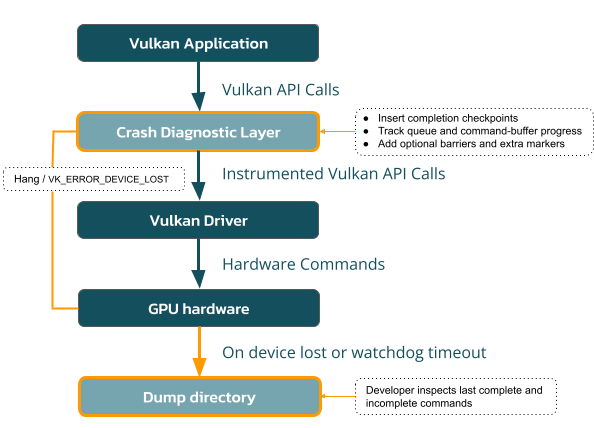
CDL sits between your application and the driver and adds the missing breadcrumbs. It tracks forward progress of queue submissions and command-buffer execution, interprets vendor fault information when extensions are present, and dumps incomplete work to a YAML file so you can see the last complete and incomplete commands.
Enable VK_LAYER_LUNARG_crash_diagnostic
during development and crash investigation, then leave it out of production builds.
How it works
- Enable CDL with Vulkan Configurator or by adding VK_LAYER_LUNARG_crash_diagnostic.
- Run the application that hangs or loses the device.
- On a fatal error (typically VK_ERROR_DEVICE_LOST) or when the watchdog fires, CDL writes a dump of incomplete work.
- Open the timestamped dump directory and inspect cdl_dump.yaml (and any dumped shaders).
Default dump locations:
- Linux: ~/cdl/
- Windows: %USERPROFILE%\cdl\
- Android: /sdcard/data/Android/<app>/cdl
Each run gets its own time-stamped folder (YYYY-MM-DD-HHMMSS) so later crashes do not overwrite earlier ones.
What CDL does not do:
CDL cannot debug inside a shader invocation. There is no portable API-level way to report an instruction pointer or source line inside a shader. Vendor tools may provide that on some hardware. CDL tells you the crash occurred in a given command (for example a draw or dispatch), not a specific line of shader code.
Built for teams who have to explain a hang
The Crash Diagnostic Layer is for anyone who has to turn an intermittent GPU hang into an actionable bug report:
- Game & Application Developers — Isolate the last draw, dispatch, or copy associated with a device loss.
- Engine & Middleware Teams — Collect comparable crash dumps across platforms and GPUs.
- Driver & GPU Engineers — Combine CDL dumps with VK_EXT_device_fault and address-binding reports.
- Q/A & Validation Teams — Reproduce exact environments and share configurations.
The Crash Diagnostic Layer evolved from Google Stadia’s Graphics Flight Recorder work. LunarG picked it up, extended it, and ships it with the Vulkan SDK.
Built, Maintained, and Delivered by LunarG
LunarG is the architect and maintainer of the Crash Diagnostic Layer. We design, implement, and ship it as part of the Vulkan SDK, in coordination with the Khronos Vulkan Working Group and the open-source community.
The Crash Diagnostic Layer is open source (Apache-2.0) and freely available. Problem reports and contributions help us improve hang diagnosis for the whole Vulkan ecosystem.

Ready to get started?
The Crash Diagnostic Layer is included in the official Vulkan SDK.
- Download the latest Vulkan SDK for Windows or Linux at vulkan.lunarg.com. (Android support ships with recent SDK releases.)
- Enable the layer by opening Vulkan Configurator and choosing the Crash Diagnostic configuration, or enable VK_LAYER_LUNARG_crash_diagnostic via environment variables or vkCreateInstance.
- Reproduce the hang or crash by running the failing workload.
- Inspect the dump directory for information about the GPU state when the crash occurred.
Prefer building from source or tracking latest changes? Clone the official repository: github.com/LunarG/CrashDiagnosticLayer
Consult the official documentation.
Recent Talks:
- Introduction to the Crash Diagnostic Layer: Vulkanised 2025
- Introduction to the Crash Diagnostic Layer: SIGGRAPH 2024
Partner with LunarG to do impossible things.
We believe collaboration is one of the great benefits and opportunities of being part of the visual computing community, and our strength is in our shared expertise. While we focus on your GPU coding issues, you can focus on creating unforgettable visual experiences.
Together, we’ll unlock the full power and potential of today’s GPU’s to surpass your customers’ expectations.