
How to Use Vulkan Debug Printf
By Tony Barbour, LunarG
Updated February 2026
Introduction
Debugging Vulkan shaders can be challenging, even with advanced tools like RenderDoc. Vulkan’s Debug Printf feature empowers developers to insert c-style printf statements directly into shaders for real-time inspection of values. This capability is fully supported in RenderDoc (allowing per-invocation examination) and can also be used through vkconfig (the Vulkan Configurator) or environment variables with the Validation Layers.
This guide walks through instrumenting GLSL, HLSL, or Slang shaders with Debug Printf and inspecting output using these tools.
Quick overview: How It Works
Without diving into too many details, Debug Printf is enabled by VK_KHR_shader_non_semantic_info (promoted to core in Vulkan 1.3; see the extension spec for more details).
To use Debug Printf, you need two things:
- A way to add printf-like calls in the shader (provided by GLSL/HLSL/Slang extensions or SPIR-V instructions).
- An implementation to consume and output the printf data (primarily the Validation Layers and RenderDoc).
Adding Debug Printf in GLSL Shaders
To enable Debug Printf in GLSL, activate the GL_EXT_debug_printf extension and insert debugPrintfEXT calls where you want to log messages or values.
Here’s a simple example:
					#version 450
#extension GL_EXT_debug_printf : enable

void main() {
    float myfloat = 3.1415f;
    debugPrintfEXT("My float is %f", myfloat);
}
Compile to SPIR-V using glslangValidator for use with vkCreateShaderModule:
glslangValidator --target-env vulkan1.2 -x -e main -o shader.vert.spv shader.vert
Every shader invocation prints the message—for example, a vertex shader drawing a triangle generates three outputs: “My float is 3.141500”.
Adding Debug Printf in HLSL/Slang Shaders
In HLSL and Slang, use standard printf:
					void main() {
    float myfloat = 3.1415;
    printf("My float is %f", myfloat);
}
Compile to SPIR-V with dxc or slangc:
dxc.exe -spirv -E main -T ps_6_0 -fspv-target-env=vulkan1.2 shader.vert -Fo shader.vert.spv
Using Debug Printf in SPIR-V Shaders
Most developers use a high-level language like HLSL or GLSL to generate SPIR-V, but you can insert Debug Printf intstructions directly into SPIR-V.
For direct SPIR-V edits, include these instructions:
					OpExtension "SPV_KHR_non_semantic_info"
%N0 = OpExtInstImport NonSemantic.DebugPrintf
Then, in any function:
%NN = OpExtInst %void %N0 1 %N1 %N2 %N3 ...
- %N0: Result ID from OpExtInstImport
- 1: DebugPrintf opcode
- %N1: OpString with format
- %N2, %N3, …: Scalar/vector values
- %NN: Undefined result ID
As mentioned previously, enable VK_KHR_shader_non_semantic_info (core in Vulkan 1.3+).
Viewing Debug Printf Messages in RenderDoc
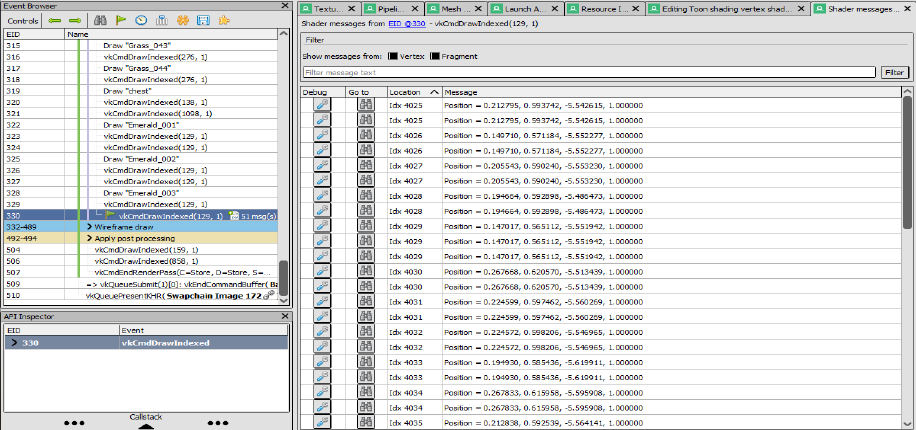
Since RenderDoc 1.14, Debug Printf output appears in the Event Browser.
You can use Sascha Willems’ DebugPrintf sample which has the debugPrintfEXT in the shader already.
- First, capture a frame
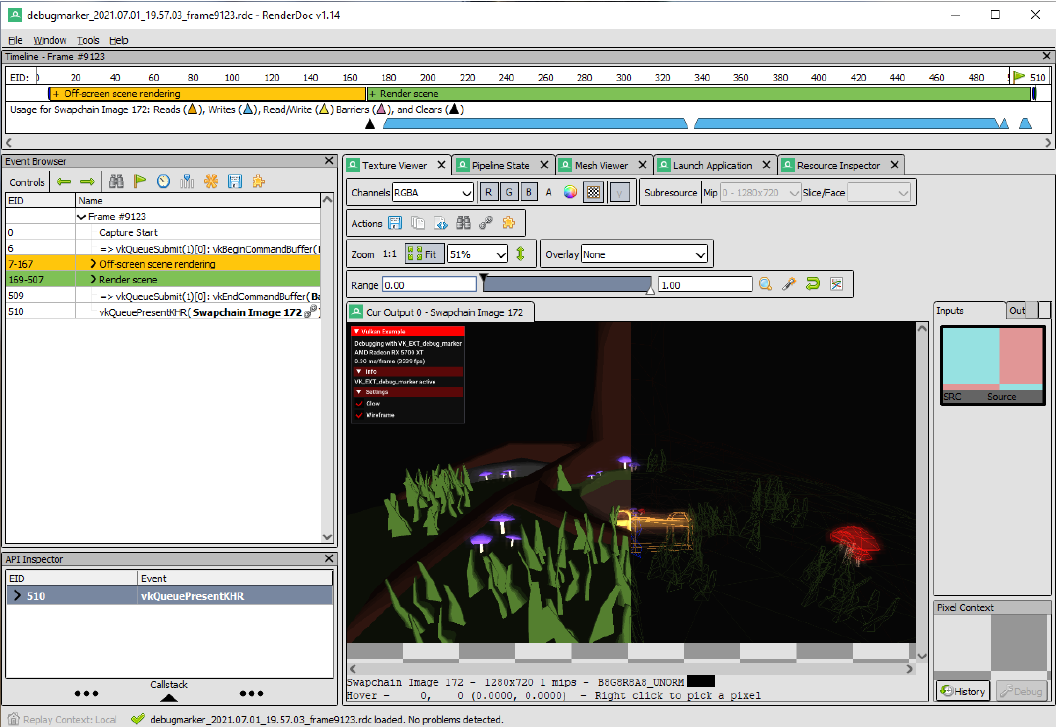
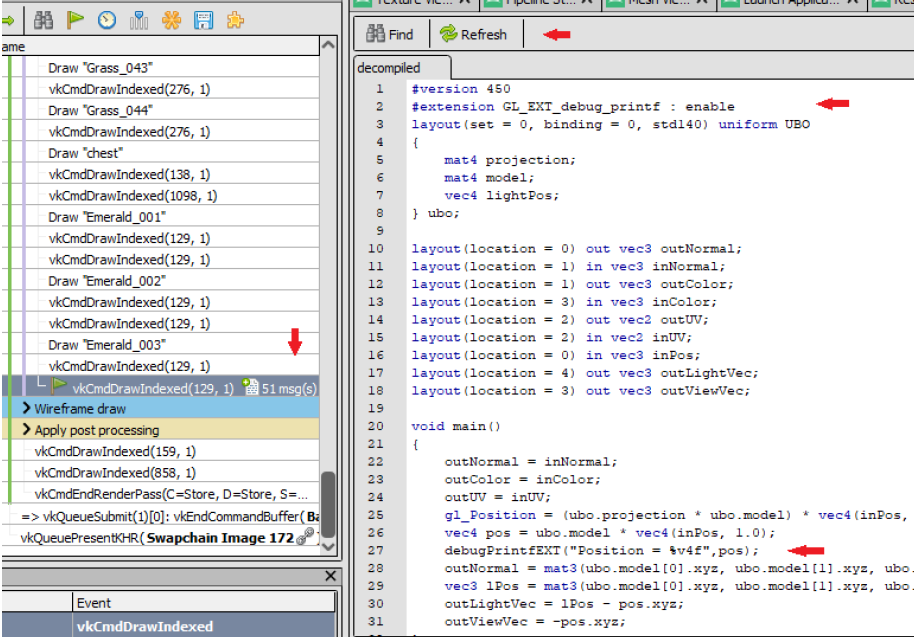
vkCmdDrawIndexed now shows message counts (e.g., 51).
- Then, click to view for per-draw output, with options to inspect or debug individual invocations.
Debug Printf Messages in the Validation Layers
The steps to use DebugPrintf in your application are:
- Add VK_KHR_shader_non_semantic_info to CreateDevice
- Add extension and debugPrintfEXT (GLSL) or printf (HLSL/Slang) to shader
Then choose one of these options:
A. Use environment variables (requires Vulkan SDK 1.4.304 or later) to enable only Debug Printf (disables normal validation warnings):
					export VK_LAYER_PRINTF_ONLY_PRESET=1

# Optional - will bypass debug callback and send directly to stdout
export VK_LAYER_PRINTF_TO_STDOUT=1
B. Use the Debug Printf Preset in vkconfig and view output in the launcher window.
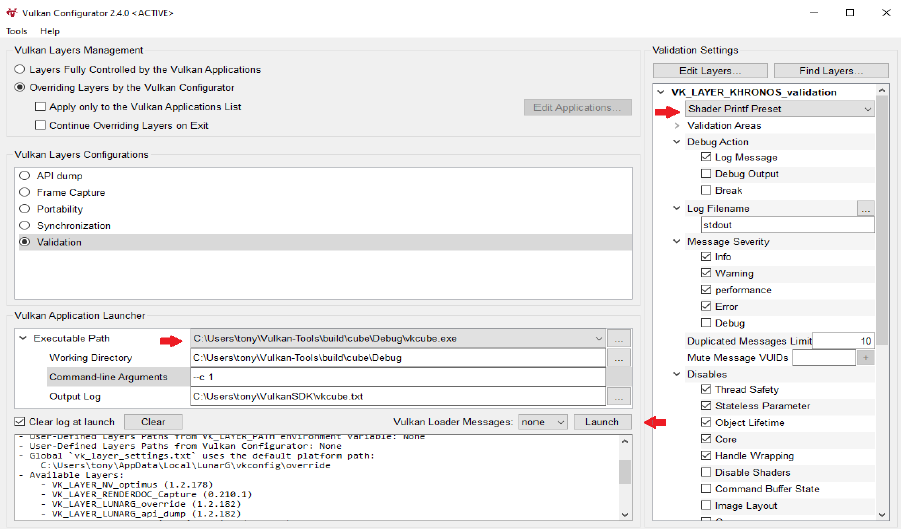
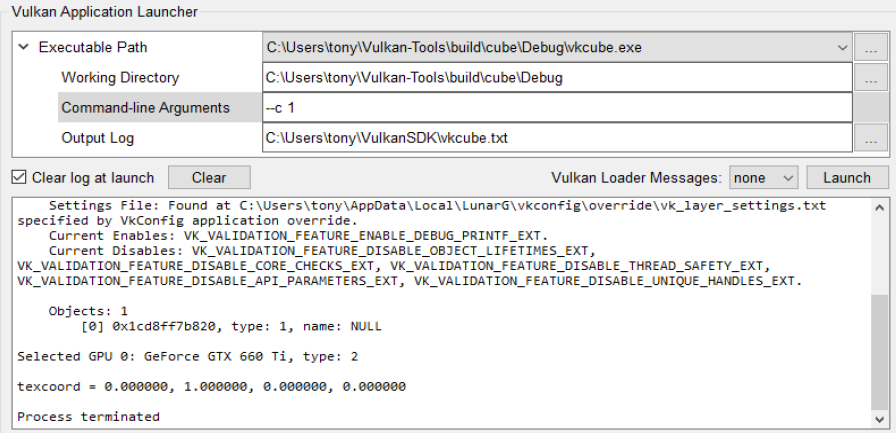
Debug Printf Format String
The format string is more restricted than traditional printf. The Validation Layers will report warnings for invalid formatting.
The format for a specifier is: %<precision><d,i,o,u,x,X,a,A,e,E,f,F,g,G,ul,lu,lx>
The format for a vector specifier is: %<precision>v[2,3,4]<specifier>
(Vectors print with “,” separators.)
- %% for literal %
- No length modifiers (except ul, lu, lx as hex)
- No strings, chars, flags, or width specifiers
- No runtime error checking beyond basic warnings
Examples:
					float myfloat = 3.1415f;
vec4 floatvec = vec4(1.2f, 2.2f, 3.2f, 4.2f);
uint64_t bigvar = 0x2000000000000001ul;

debugPrintfEXT("Here's a float value to 2 decimals %1.2f", myfloat);
// "Here's a float value to 2 decimals 3.14"

debugPrintfEXT("Here's a vector of floats %1.2v4f", floatvec);
// "Here's a vector of floats 1.20, 2.20, 3.20, 4.20"

debugPrintfEXT("Unsigned long as decimal %lu and as hex 0x%lx", bigvar, bigvar);
// "Unsigned long as decimal 2305843009213693953 and as hex 0x2000000000000001"
Limitations
Limitations of Debug Printf include:
- Consumes a descriptor set. If your application uses all descriptor sets on the GPU, Debug Printf won’t work.
- Consumes GPU device memory. Many/large messages can exhaust memory (adjust buffer size via settings).
- Requires Validation Layers version: 1.2.135.0 or later.
- Requires Vulkan API 1.1 or greater.
- VK_KHR_shader_non_semantic_info must be supported and enabled (core in 1.3+).
- RenderDoc 1.14 or later
Additional Resources
Revision History
- August 2021: Originally published
- February 2026: Updated for ongoing support and best practices.