Vulkan SDK
The Complete Development Kit for Cross-Platform Graphics and Compute
The Vulkan SDK is the official, complete development kit for the Vulkan API — the industry-standard, cross-platform graphics and compute API from the Khronos Group.
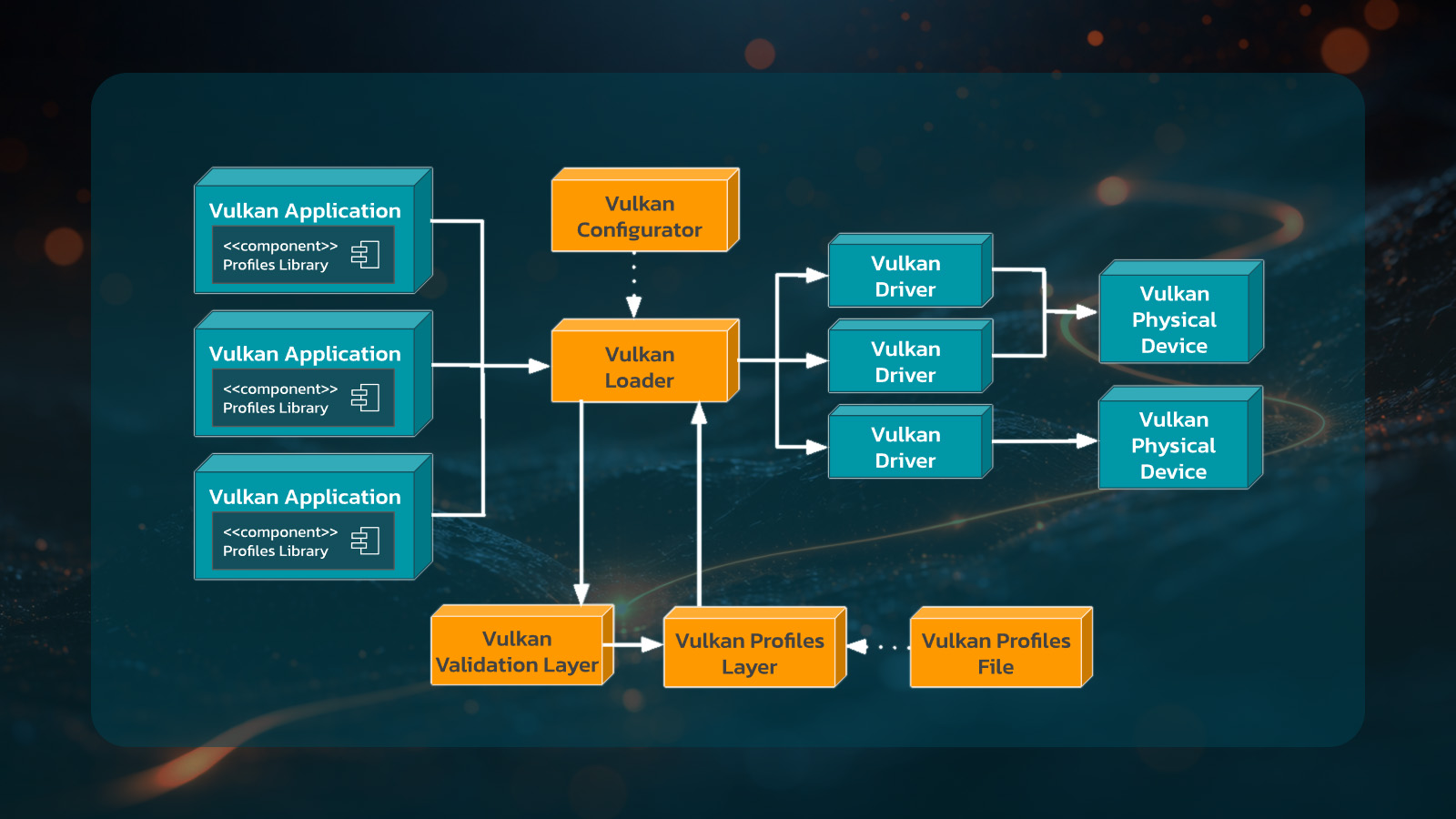
Built and maintained by LunarG, it provides everything developers need in one curated package: headers, loaders, validation layers, debugging and profiling tools (such as Vulkan Configurator and GFXReconstruct), shader compilers, and runtime components for Windows, Linux, and macOS (via KosmicKrisp). It enables high-performance, portable application development with the latest Vulkan features, including ray tracing and video extensions.
This makes it the essential starting point for building modern games, engines, tools, and compute workloads on Vulkan.
Easy, reliable setup
Essential tools included
Cross-platform and up-to-date
Maintained and released by experts
Free and production ready
Industry Verticals
In short, the Vulkan SDK is a critical enabler for performance, portability, and reliability across the GPU ecosystem.
- Game development and interactive entertainment
- Automotive and safety critical systems
- Scientific visualization and compute
- Media and entertainment
- Embedded and mobile systems
- AI and GPU compute
- Medical visualization
- Media and entertainment
Vulkan SDK Features
The Vulkan SDK removes the friction of building a Vulkan development environment from scratch, letting developers focus on high-performance, portable graphics and compute applications while providing industry-leading tools for validation, debugging, and optimization. These features make it the essential foundation for game engines, professional tools, automotive visualization, scientific computing, and any project requiring explicit GPU control. For the most current details, check the official download page at vulkan.lunarg.com.
Complete, curated development package
- One-stop installer (Windows) or easy-to-use tarball/zip (Linux/macOS) that installs everything in the correct locations with guaranteed compatibility.
- Includes headers, Vulkan Loader, runtime components, and an optional updated Vulkan Runtime for Windows.
- Pre-built and vetted tools — no manual assembly or version conflicts.
Powerful validation and debugging
- Khronos Validation Layer (VK_LAYER_KHRONOS_validation) — the core API usage validation with extensive error checking, best practices, and improved VUID coverage.
- Additional LunarG utility layers: API dump, screenshot, monitor (FPS overlay), crash diagnostic, shader object emulation, and more.
- Vulkan Configurator (vkconfig) — easy GUI for enabling/disabling layers, setting options, and configuring the Vulkan environment.
API capture and replay
- GFXReconstruct — robust frame capture and replay for debugging, performance analysis, and regression testing across platforms.
SPIR-V shader toolchain
- Comprehensive shader compilation, optimization, reflection, and validation tools, including glslc, SPIRV-Tools, SPIRV-Cross, SPIRV-Reflect, Slang, DXC, and more.
- Supports modern shader workflows for graphics and compute.
Portability and consistency tools
- Vulkan Profiles Toolset — helps create portable applications by defining and merging capability profiles (extensions, features, limits) across hardware.
- Supports Vulkan Roadmap 2026 Profile for greater hardware consistency on high-end devices.
- Full support for the latest Vulkan 1.4 core API, plus many new extensions (including emerging ones like descriptor heaps).
Cross-platform support
- Consistent experience across desktop, mobile (Android), and embedded platforms.


Developer-friendly maintenance, release, and licensing
- Up-to-date documentation, release notes, and license registry.
- Official download hub at vulkan.lunarg.com.
- Regular updates with improved validation, new extensions, and ecosystem enhancements.
- Free, open-source roots with professional packaging and maintenance by LunarG.
Built, Maintained, and Delivered by LunarG

In close coordination with the Khronos Vulkan Working Group, LunarG defines, develops, and maintains many of the core components that power the Vulkan SDK, including:
- The Vulkan Loader
- Khronos Validation Layers
- GFXReconstruct capture/replay tool
- Vulkan Configurator
- Extensive SPIR-V toolchain and shader tools
- Crash diagnostic layer
- KosmicKrisp


Getting Started with the Vulkan SDK

Run the installer for your development environment.

Open a terminal/command prompt. Run vulkaninfo. You should see your GPU(s), supported Vulkan version, and extensions listed.
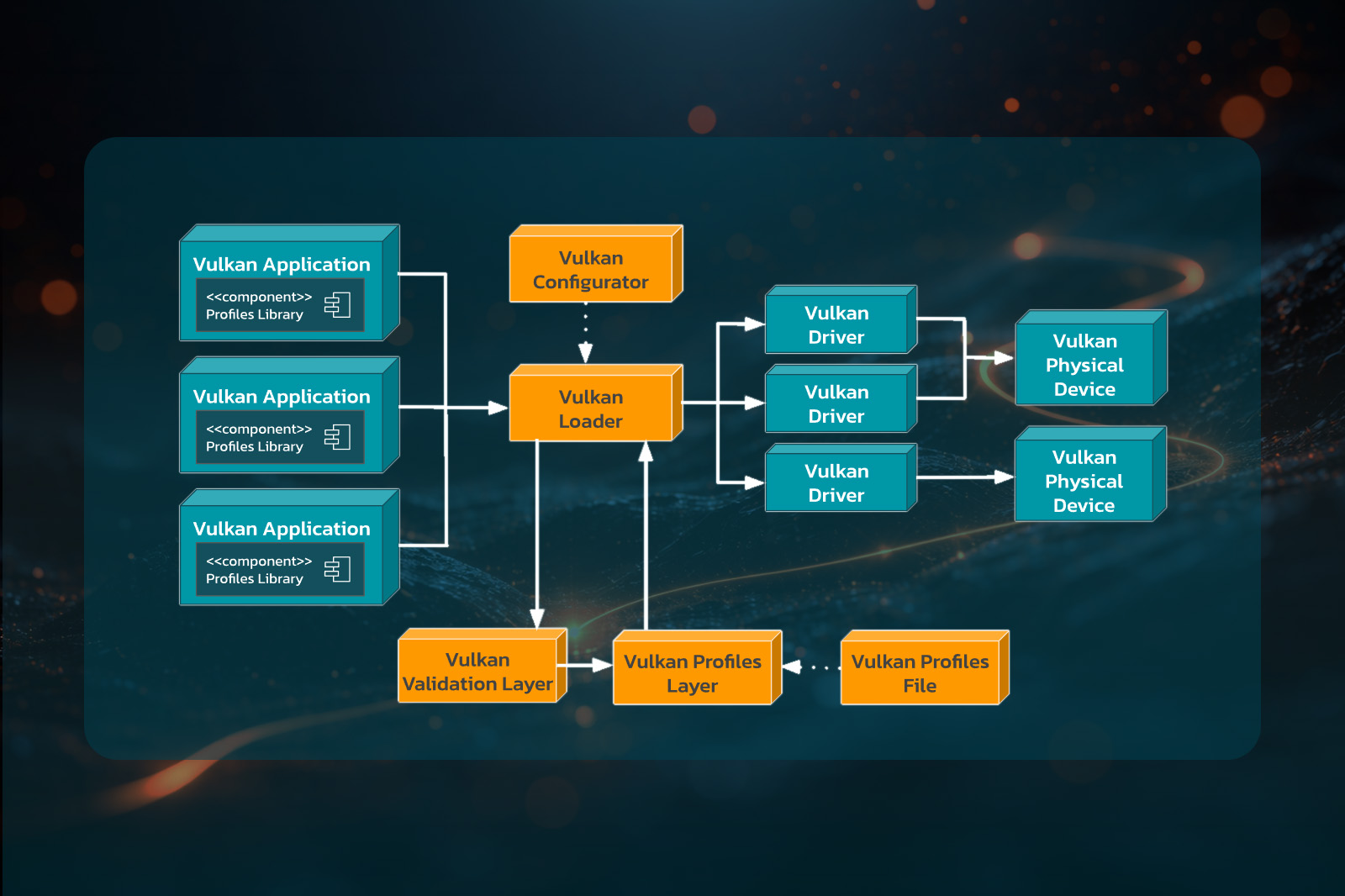
Launch Vulkan Configurator (vkconfig) to enable validation layers and tune settings.
Go to vulkan.org/learn and explore Vulkan tutorials, videos, samples, and demos.
What People Say About the Vulkan SDK
Partner with LunarG to do impossible things.
We believe collaboration is one of the great benefits and opportunities of being part of the visual computing community, and our strength is in our shared expertise. While we focus on your GPU coding issues, you can focus on creating unforgettable visual experiences.
Together, we’ll unlock the full power and potential of today’s GPU’s to surpass your customers’ expectations.